
Checklist Tool
|
Home Download Purchase Text Tools Math Tools Programming Units Calendar Checklist |
No joke!
The checklist tool helps organize tasks into multi-tiered sub-tasks. Add, edit, and delete tasks from your checklist, and then change the task status by double-clicking on the item.
A task with a red dot next to it is a task which has not been completed. A task with a green dot has been fully completed. Tasks with a half-circle are tasks which have been partially completed (that is, some--but not all--of the sub-tasks have been completed).
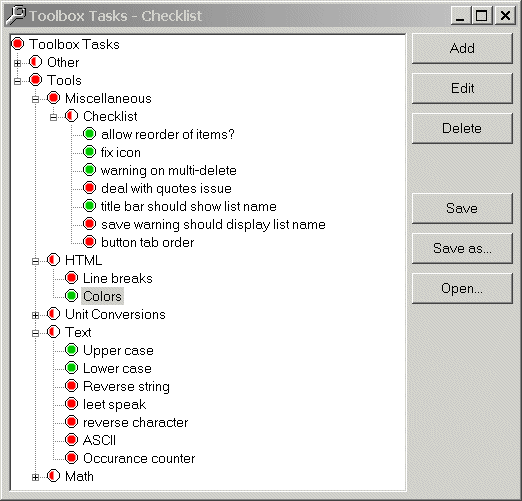
The Checklist tool automatically keeps track of the hierarchy, so the user can just check off items as they are completed.
As you can undoubtedly see from the image above, I found this tool very useful in designing this toolbox.
Download this software - 30-day Test Drive!



