 Customizing symbol groups
Customizing symbol groups
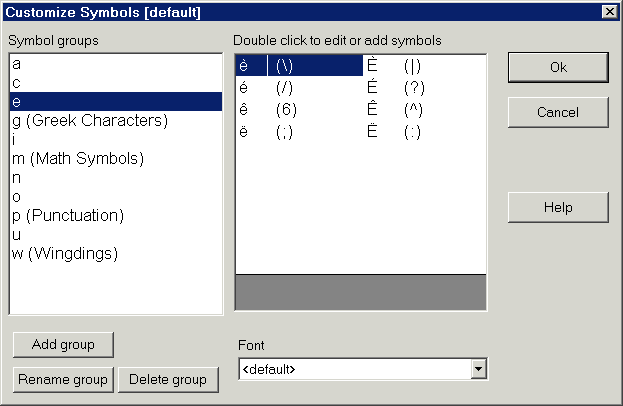
If you don't like the character groups defined in Accenter, you have the ability to change them. The changes you make to the character groups are associated with your Windows login, which means multiple users can have their own customized character groups, which do not effect the other users. Your user name appears in brackets at the top of the dialog. If you entered no user name when you logged onto Windows, this will appear as [default].
There are two ways to get the dialog box for customizing the character groups:
Adding a symbol group
To add a new group of symbols (special characters), click the 'Add group' button. You will be prompted to enter a name for the symbol group. The first letter of the name is the hotkey for that group. Whatever follows is a description to help you remember what the group contains. For example, you might want to have a group of special characters from a symbol font, such as 'Vacation MT'. You could create a symbol group with the name 'v (Vacation font). Now, whenever you press ALT-V, you activate the Vacation symbols.
NOTE: The first character of the name must be different than the first letter of all the existing groups.
Renaming a symbol group
To rename a symbol group, select an existing group and click the 'Rename group' button. You will be prompted to type a new name. You might want to do this if you don't like the description of an existing group. For example, you might not use math symbols very much. In which case, you might want to rename this group as 'm (Miscellaneous)'
NOTE: The first character of the name must be different than the first letter of all the existing groups.
Deleting a symbol group
To delete a symbol group, select the group you want to delete and click the 'Delete group' button. This permanently deletes that group and all the symbols it contains.
Setting a group font
You have the ability to set a specific font for a group. If you choose not to set the font (leaving it as <default>), then whenever you select a character from that group, the current font is used. Set the font if the symbols you use are from a specific font. For example, all the greek letters are in the Symbol font, so the group 'g (Greek letters)' uses the Symbol font.
HTML Help file Copyright © 2001 by Virtu Software